How to Organize a Meeting
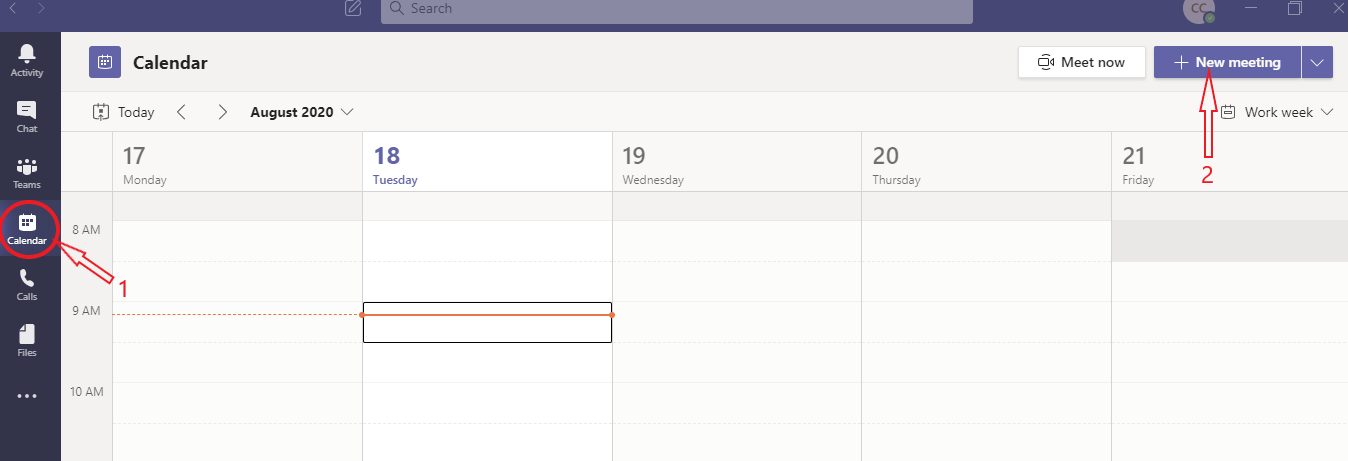
- Click on the calendar icon
- Click to create a new meeting
- Add the title
- Add participants' names
- Add the date
- Input content
- Click to save the meeting
Microsoft Teams is a platform available in Web and Desktop Application versions. If you already have a professional teams account and you want to connect to the DISSO platform you can :
If you are using your professional team account with your favourite browser, you will have to follow these steps to access the DISSO platform:
Click on the Microsoft Teams icon or Enter the link https://teams.microsoft.com in your browser, preferably Internet Explorer or Chrome.
Go to the Applications folder and click on Microsoft Teams
Tap the Teams icon
Secrétariat Exécutif du 9ème Forum Mondial de l'Eau
SMD1 immeuble C - 1er étage
Diamniadio - Sénégal
Email : contact@worldwaterforum.org
M. Abdoulaye SENE, Secrétaire Exécutif
DIGISSOL SARL
N°26/B - Rue HB-314 - Hann Mariste
Dakar - Sénégal
Email : contact@digissol.com